Digital Planner for Seniors: 8 Checks Before You Buy
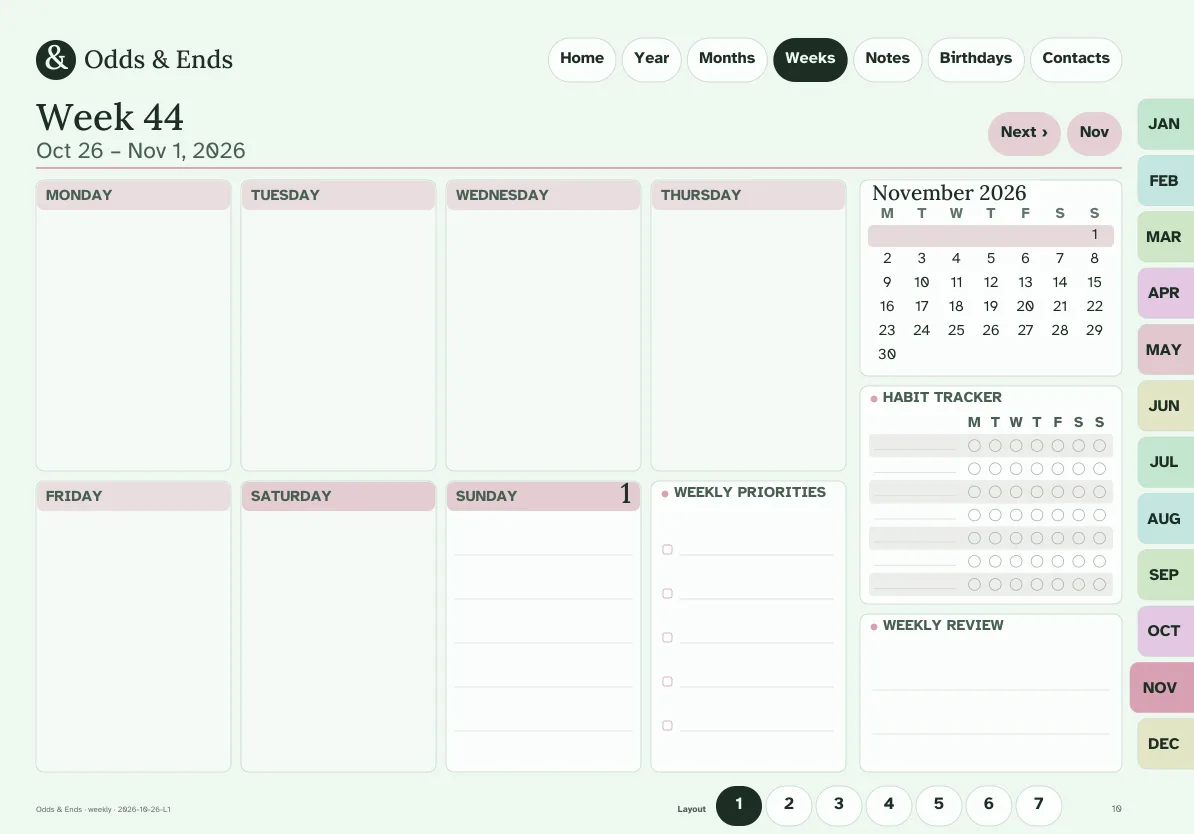
The best digital planner for seniors is the one you can read without squinting and operate without a manual. Most planners sold for tablets are designed by and for people in their twenties: tiny type, light gray lines, dozens of icons, and a layout that expects you to know where to tap. That is a poor match for anyone who simply wants to write down an appointment and find it again next week.
Below are eight checks that separate a planner that will be opened every morning from one that is abandoned by February. Use them on any planner you are considering, including Odds & Ends Digital Planner.
1. Type size you can read at arm's length
Tablets are often used propped on a table or held further away than a phone. Body text under 12 points looks fine on a product photo and feels cramped in real life. In Odds & Ends Digital Planner the standard pages use body text of 14 points or more, and the Large Print edition goes to 18 points or more. If a listing never states a type size, assume it is small and look at a full-size screenshot before buying.
2. Contrast, not just color
Pastel planners photograph beautifully and read badly. Look for dark ink on a light background and avoid thin gray rules that disappear in sunlight. The planner uses ten color themes (Sage, Lavender, Rose, Sky, Butter, Terracotta, Ocean, Classic Navy, Blush, Charcoal & Cream), all with a light page and dark ink, so choosing a color is a matter of taste rather than a trade-off with legibility. The text face is Atkinson Hyperlegible, which was designed by the Braille Institute for low-vision readers, paired with Lora for titles.
3. Writing lines tall enough for real handwriting
This check is the one most buyers skip. Handwriting on a tablet is larger and less steady than on paper, especially with a fingertip or a thick-tipped stylus. Writing lines should be at least 34 points tall; the Large Print edition uses 44 points. If lines are 20 points apart, you will write over the rule above or below and the page becomes untidy fast.
4. Tabs that are easy to hit
A digital planner works through links. Tap the month tab and you jump there. The tabs need to be large enough to hit on the first try. Here the navigation tabs are at least 44 points on a side, which is the size usability guidelines use for touch targets. The top bar (Home, Year, Months, Weeks, Notes, Birthdays, Contacts) and the twelve month tabs are on every page, in the same place, so you never have to remember where a menu went.
5. The same navigation everywhere
Confusion is the usual reason people drop a digital planner. If the menu changes from page to page, every screen feels new. Ask whether the home button is on every page and whether it takes you to the same place. A good test: open any page at random and find the way to the current week in one tap.
6. Sections for life, not for a startup
Many planners are organized around goals, habit stacks and productivity systems. A planner for everyday life needs different pages: birthdays and anniversaries, appointments, contacts and important information, home and bills, meals and groceries, recipes, travel, and a place for notes. Odds & Ends Digital Planner has 20 sections and 41 template designs along those lines, and the Birthdays and Contacts tabs sit in the top bar.
You do not have to use all of them. Start with the weekly page and the birthday list, and open other sections when you need them.
7. Setup written in plain language
A planner is a PDF. To use it you import it into a note-taking app. That one step is where many people stall, so look for setup instructions written without jargon and covering the app you actually own. The bundle includes a Quick-Start Guide in large print that covers GoodNotes, Notability, Samsung Notes, Xodo and Noteshelf. The planner has not been verified on Kindle Scribe or reMarkable, so if you own one of those, check before buying.
8. A price that does not renew
Some planners are sold as monthly subscriptions that stop working when you stop paying. Odds & Ends Digital Planner is a one-time purchase at $36.99. You receive PDF files you keep, and you can re-import them whenever you change tablets. If you want to compare the economics, see subscription versus one-time purchase.
How the eight checks apply to this planner
| Check | What to look for | In Odds & Ends |
|---|---|---|
| Type size | 14 pt or larger body text | 14 pt standard, 18 pt Large Print |
| Contrast | Dark ink on light page | Ten light themes, dark ink |
| Writing lines | 34 pt or taller | 34 pt standard, 44 pt Large Print |
| Tabs | 44 pt touch targets | 44 pt or larger |
| Navigation | Same menu on every page | Top bar plus 12 month tabs |
| Sections | Everyday life pages | 20 sections, 41 templates |
| Setup | Plain-language guide | Large-print Quick-Start Guide |
| Price | One payment | One-time purchase |
Which edition should you start with?
If reading comfort is your priority, start with a Large Print file. There are eight: portrait or landscape, Monday or Sunday start, in Sage or Charcoal & Cream. Compare the portrait and landscape layouts in the Large Print guide to pick one. If you only need slightly larger text than most planners offer, the standard dated files give you ten colors and the same sections.
The dated pages cover November 2026 through December 2027. If you would rather set your own dates, the undated files work on any schedule; the undated setup walkthrough explains how.
A realistic first week
Do not try to fill in the entire planner. On the first day, import one file, open it, tap through the top bar once, and write one appointment on the weekly page. On the second day, add the birthdays you always forget to the Birthdays section. By the end of the week you will know whether the weekly layout suits you, and switching to a different one is a matter of tapping a link on the week page. Resist the urge to customize before you have used it for a week; the first week is for finding out which pages you actually reach for.
What a digital planner will not do
A PDF planner is a writing surface with good navigation. It will not send alerts, synchronize contacts or pay bills for you. Some people see that as a limitation; many find it the point, because nothing nags and nothing breaks. Check your device's own reminder app if you need an alarm, and use the planner for the plan itself.
Compare what is in each file before you choose, and take your time. A planner suited to your eyes and hands is worth more than one with the most features.