Digital Birthday Book: Keep Every Family Date in One Place
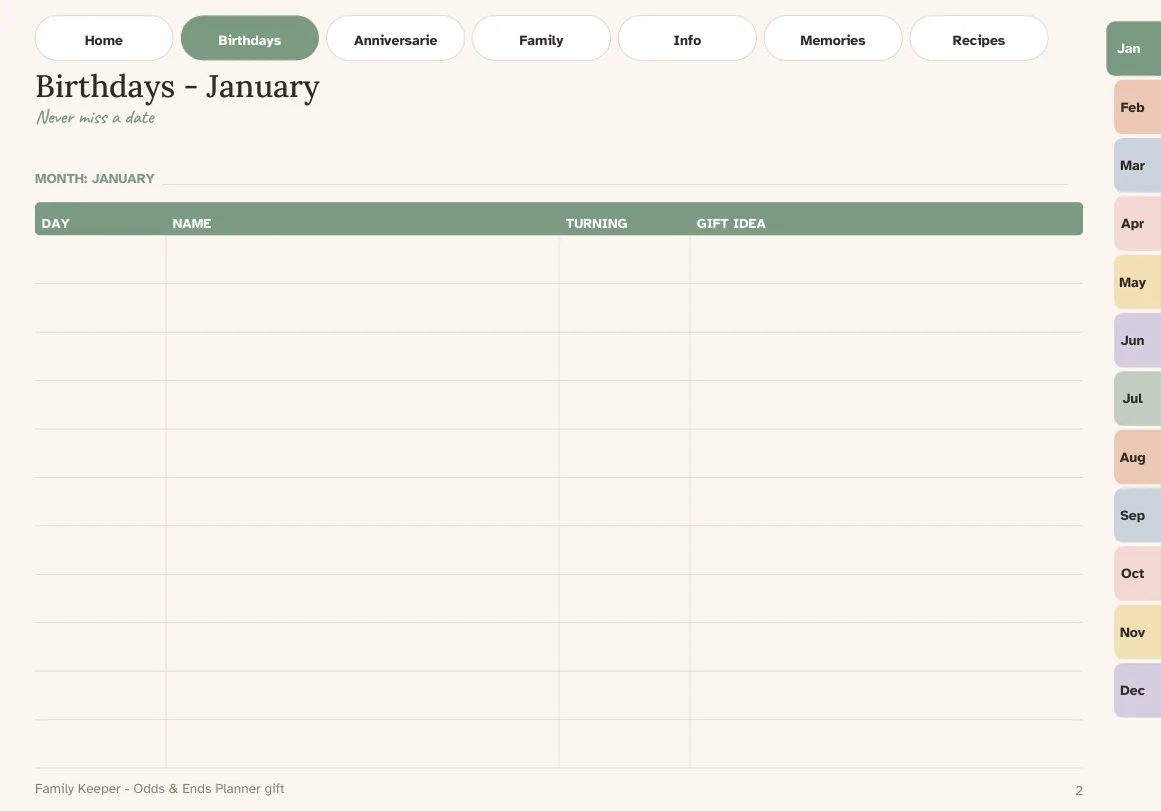
A digital birthday book does one job: make sure you never discover a birthday the day after. Paper address books fill up with crossed-out phone numbers and the birthdays end up scattered across a wall calendar, a diary and your memory. A tablet planner lets you gather them in one place and keep it neat as people move, marry or add grandchildren.
Here is how to set one up properly, what to record, and how Odds & Ends Digital Planner supports it.
What a good birthday book records
It is tempting to write only the date. Add a few fields and the book becomes useful all year:
- Name and relationship. "Margaret (Tom's sister)" saves you at a party.
- Date, and the year born if you want to track ages.
- Gift ideas. Write them when you think of them, such as "likes tea, allergic to lilies".
- Address and phone. Mailing a card needs it.
- Anniversaries and memorial dates. Weddings, and dates you want to remember quietly.
Do not try to fill all of this in at once. Start with name, relationship and date, and add the rest as you contact each person.
Organize by month, not by alphabet
An alphabetical address book answers "what is Sarah's number?". A birthday book should answer "who is next?". Organizing by month gives you a twelve-section list, and looking at the next month once a week is enough to keep up.
In Odds & Ends Digital Planner the Birthdays & Anniversaries section is a tab in the top bar on every page, so it is one tap from wherever you are. The month tabs along the page edge take you to the matching month, where you can write the events and see the dates alongside appointments.
Set up in four steps
- Collect the sources. Gather the paper address book, old cards, the wall calendar and your phone's contacts. Put them next to your tablet.
- Write the next twelve months first. Go month by month and enter the birthdays and anniversaries you know. Do not copy the whole address book yet.
- Add contacts in batches. Use the Contacts and Important Info pages for the people you actually reach out to. Ten a day is plenty.
- Connect it to the calendar. On the month page, write a short note like "Dad's birthday" on the date so you see it when you look at the week.
Use the Family Keeper for what a birthday list cannot hold
A list of dates does not hold the rest of family life: children and grandchildren's names, who lives where, favorite things, important family details. The Family Keeper pages included with the planner give that a home. They are written pages, not a database, so you decide how much to record. Many people fill in one page per household and keep it up to date once a year around the holidays.
A weekly habit that makes it work
A birthday book only helps if you look at it. Pick one moment each week, such as Sunday evening with your tea, and glance at the next two weeks. If a card needs mailing, write "send card" on the week page. It takes less than a minute and you stop being surprised.
The weekly page is where plans meet reality; the weekly layouts guide explains which one works best for reminders like this.
Paper book vs digital book
| Paper | Digital in a planner | |
|---|---|---|
| Fix a changed address | Cross out, rewrite | Erase and rewrite cleanly |
| Find a date | Flip pages | Tap the Birthdays tab |
| Running out of space | Squeeze in margins | Duplicate a page |
| Backup | None | Copy the PDF |
| Battery needed | No | Yes |
The paper version has the benefit of never running out of battery. If that matters, keep a paper list as a backup, or export your planner to a PDF and print the Birthdays pages once a year.
Privacy and safety
Contact details are personal. Keep your planner file in an app that is protected by your device passcode, and think before sharing exported pages. The planner includes pages for important information; do not store full financial passwords or account numbers in anything you might share.
Limits to know
The planner is not a contacts app. It will not import from your phone, sync across devices or send alerts, and numbers you write are not tappable as call links. If your goal is to be reminded automatically, set the alert in your device calendar and let the planner hold the master list, notes and gift ideas.
What else goes well with it
Once birthdays are in, the same habit works for appointments and household dates. The planner checklist for seniors shows the other pages many people begin using, and the walkthrough of files and sections explains how the Birthdays section fits among the 20 sections.
If you also want to navigate between pages quickly, the way internal links work is covered in the hyperlinked planner guide.