Notion vs Obsidian: Which One Fits Your Personal System?
Choose Obsidian if your system is mostly writing and linking notes; choose Notion if it is mostly structured information such as tasks, projects and trackers. Both can do a bit of the other's job, but each does its main job with less effort. This comparison focuses on a personal system, meaning notes, tasks, projects and routines for one person, and avoids features that matter only to teams.
Tool details change over time, so check each app's current pricing and feature pages before you commit.
The one-line difference
- Obsidian is a notes app built around plain Markdown files stored on your own device, with links between notes and a large community of plugins.
- Notion is a workspace built around pages and databases that you view as tables, boards, calendars and more, with relations between databases.
Everything else follows from that.
Side by side
| Question | Obsidian | Notion |
|---|---|---|
| How is data stored? | As Markdown files in a folder on your device | In Notion's cloud workspace |
| Core strength | Linked, text-first notes | Databases with views and relations |
| Tasks and projects | Possible with plugins and conventions | Built in with status, dates and relations |
| Trackers (habits, finance) | Possible, but you assemble them | Natural fit: a database with views |
| Linking notes | Backlinks and a graph view are central | Links and mentions exist; databases carry the structure |
| Customization | Settings, themes, community plugins | Properties, views, formulas, templates |
| Cost for personal use | The core app costs nothing for personal use; Sync and Publish are paid extras | Offers several plans; check current limits |
| Setup effort | Quick to start writing; more to configure for tasks | Quick for databases; more to design a whole system |
Where Obsidian is stronger
- Ownership of files. Your notes are ordinary text files that other tools can open. If you want the longest-lasting archive, this matters.
- Writing and linking. Backlinks make it easy to see where an idea is mentioned. If your work is research, journaling or long-form writing, this is a real advantage.
- Speed for plain notes. Opening and searching a folder of text files is fast.
- Control through plugins. The community plugin library lets you shape it to your style.
Where Notion is stronger
- Structured data. Status, due date, priority, relations and rollups are native, so a task manager takes minutes instead of an afternoon of plugin choices.
- Views. The same database can be a table, a board, a calendar and a gallery, which is how a dashboard works.
- Relations and rollups. A project can show its tasks' progress without manual counting.
- Sharing a page with another person is straightforward, if you ever need it.
Which fits which person
| If you mostly... | Lean toward |
|---|---|
| Write, research and connect ideas | Obsidian |
| Manage tasks, projects, habits and budgets | Notion |
| Want your notes as local plain files | Obsidian |
| Want one visual home screen | Notion |
| Like tuning your tools with plugins | Obsidian |
| Prefer something that works with less tuning | Notion |
Many people split the difference: Obsidian for long-term notes, Notion for the life-management layer. That works if you decide beforehand which tool owns which kind of item. A shared rule helps: notes about ideas go to Obsidian; anything with a status or a date goes to Notion.
The real cost: setup, not subscription
For most personal systems the deciding cost is not price but time. Building a task manager, project tracker, habit tracker and weekly check-in from scratch takes hours in either app, and the time you spend designing is time you are not using the system.
This is the main reason people buy a pre-built Notion setup: they want the structure without the build. That path is covered in the guide to building a Notion second brain, and the page on Notion Life OS shows what a complete structure contains. If you want to browse options first, see the Notion template guide.
What a pre-built Notion system provides
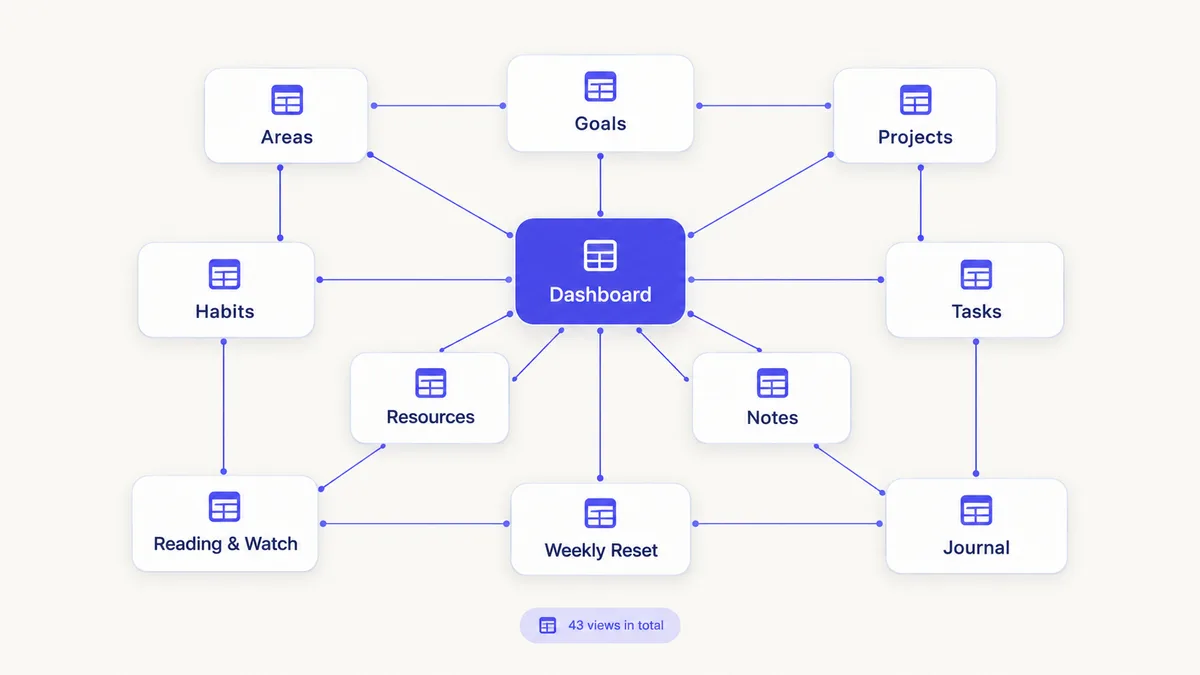
If you decide on Notion, Clarity OS is one way to skip the build. It provides 10 connected databases (Areas, Goals, Projects, Tasks, Notes, Resources, Habits, Reading & Watch, Weekly Reset and Journal) with 19 relations, a Dashboard, a Quick Capture page and a Weekly Reset ritual, plus sample rows marked "Example" and a view in each database to delete them. A library of 120 page templates in eight categories handles specific cases, and a Formula Cookbook with 60 formulas helps when you want to extend the system; its basics are covered in the Notion formulas cheat sheet.
It does not turn Notion into Obsidian: there is no local-file storage or graph view. If those matter most to you, Obsidian is the better base.
How to decide in a week
- Write down the five things you do most in a typical week (writing notes, tracking tasks, planning, reading, budgeting).
- For two days, try each tool on the same real material.
- Notice where you hesitated or looked for a workaround.
- Pick the tool that made your most frequent task easiest.
The best system is the one you open every day, so choose by what you do most, not by which tool has more features.